

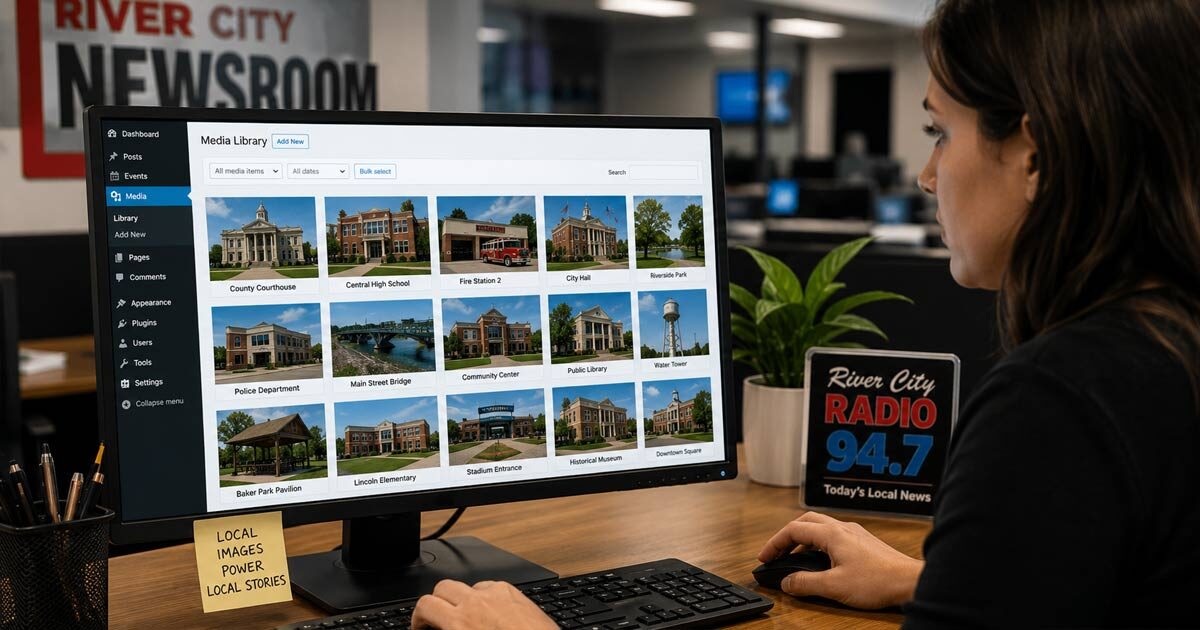
We have opened plenty of WordPress Media Libraries filled with files named IMG_4827, IMG_4828, and IMG_4829. The pictures may be useful, but nobody knows what they show without opening each one individually. A newsroom can collect thousands of original local photos and still struggle to find the one it needs when the archive is not organized as it grows.
The goal is not simply to put more pictures into WordPress. The goal is to build a library that someone else can search months or years later, often while trying to publish a story quickly. That requires giving every photo a title that describes what it actually contains.
We recommend including the subject, location, and useful detail whenever possible. “Rankin County Courthouse — Main Street Entrance” will be far easier to find than “Courthouse,” while “Madison Central High School — Football Stadium Entrance” tells an editor exactly what the image shows before opening it.
The best time to add that information is while taking the photo. The person standing in front of the building knows its name, where they are, and what part of the property appears in the picture. Asking someone in the newsroom to figure that out later creates another step and increases the chance that the image will remain buried under its original phone filename.
It also helps to capture more than one view of important locations. A courthouse may need a wide exterior photo, a close view of the entrance, a shot of the sign, and another image showing the building from across the street. Each one can support a different kind of story, provided the titles make those differences clear.
Photo credits should be handled with the same consistency. We recommend using the employee’s name, the station or publication name, or another agreed-upon credit format rather than leaving everyone to invent their own. That gives editors reliable information when the photo is eventually published.
CaptureRelay allows the person taking or selecting the image to add a title and default photo credit before sending it. The app then prepares a properly sized copy for the selected website and delivers it directly into the WordPress Media Library, where that information remains with the attachment.
Begin with ten familiar places your organization covers repeatedly and capture two or three useful views of each one. Give every image a title that another staff member could understand without opening it. Thirty organized local photos will be more valuable during a busy news day than hundreds of mystery files nobody has time to inspect.
CaptureRelay gives approved iPhone and Android devices a direct path to the WordPress Media Library, including image titles and optional photo credits. The mobile app is a one-time purchase, and the companion WordPress plugin is free.