Features How it works Security WordPress plugin Pricing FAQ Contact Get the app
Capture. Relay. Publish.

The fastest path from your camera to WordPress.

CaptureRelay turns your phone into a field-ready image pipeline. Shoot or pick a photo, and it lands in your WordPress Media Library perfectly cropped, resized, and compressed — no laptop, no plugins to fiddle with, no logins to type.

Free WordPress plugin No account required iOS & Android
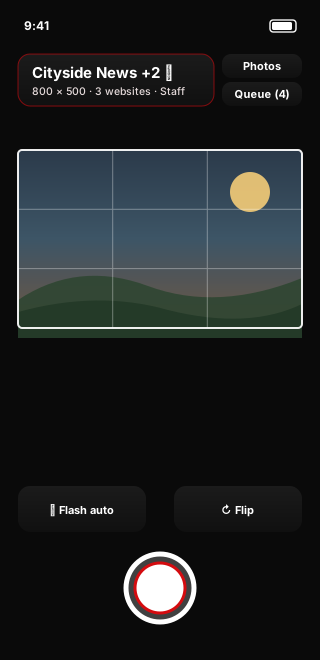
CaptureRelay camera screen with an on-screen framing guide and multi-site selector

Built for people who shoot in the field

Local news Real estate Landscaping & trades Community & events
Why it exists

Getting a photo onto your website shouldn't take longer than taking it.

The usual routine — email it to yourself, download it, open an editor, crop and shrink it, log in to WordPress, upload, repeat — burns minutes you don't have when a story, a listing, or a finished job is right in front of you. CaptureRelay collapses all of it into a single tap.

Minutes back, every shoot

Skip the export-edit-login shuffle. Frame it, tap send, and move on to the next shot while it uploads in the background.

Consistent sizing, on autopilot

Every image arrives at the exact width, height, and quality your site expects — so your galleries and archives stay clean and uniform.

One shot, many sites

Send the same photo to several WordPress sites at once, each receiving its own perfectly sized copy — ideal for teams and multi-site publishers.

What it does

A complete field-to-publish toolkit in your pocket.

Purpose-built for getting real photos onto real websites, fast — without ever compromising on security or image quality.

Shoot or pick

Capture a fresh photo in portrait or landscape with a pro camera, or import one or many existing images through the native photo picker.

Live framing guide

An on-screen guide shows the exact area that will be delivered, so what you frame is precisely what publishes — with an optional rule-of-thirds grid.

Multi-site delivery

Assign a photo to multiple approved sites. Each gets its own copy at that site's custom dimensions and JPEG quality.

Offline upload queue

Weak signal? Photos are processed and queued on-device, then sent automatically when you're back online — with no duplicates.

Titles & photo credit

Add an optional title and a default photo credit so attribution and captions travel with the image into WordPress.

Metadata stripped

EXIF, GPS location, XMP, and IPTC data are removed from every image before it reaches your Media Library. Clean files, protected sources.

How it works

Set up once. Then it's just point, shoot, send.

Connecting a site takes about two minutes and one administrator approval. After that, publishing a photo is a single tap.

Connect & approve

Install the free plugin on your WordPress site. In the app, add the site URL and request access. An administrator approves your device once — no username or password is ever entered in the app.

Capture or choose

Open the camera and frame your subject inside the guide, or pick existing photos from your library. Select one destination site or several at once.

Relay & publish

Tap send. CaptureRelay crops, resizes, and compresses a copy for each site and delivers it straight to the Media Library — ready to drop into a post or gallery.

Multi-site delivery

One capture. Every site gets exactly what it needs.

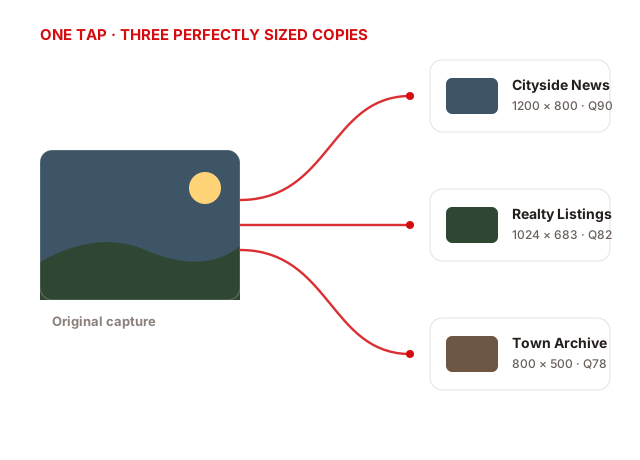
Manage a newsroom, a brokerage, and a community archive from a single phone. Turn on the sites you want, and CaptureRelay produces a tailored copy for each — no re-shooting, no re-exporting.

  • Per-site dimensions. Each site keeps its own exact width and height.
  • Per-site quality. Independent JPEG compression and maximum file size.
  • Framing you control. The lead site drives the guide so you always know what will publish.
Diagram: one original capture fanning out to three WordPress sites, each at its own dimensions and quality
Never lose a shot

Bad signal at the scene? Your photos still make it.

Fieldwork happens in parking garages, rural roads, and packed venues. CaptureRelay processes every image immediately and holds it in a secure on-device queue until it can deliver.

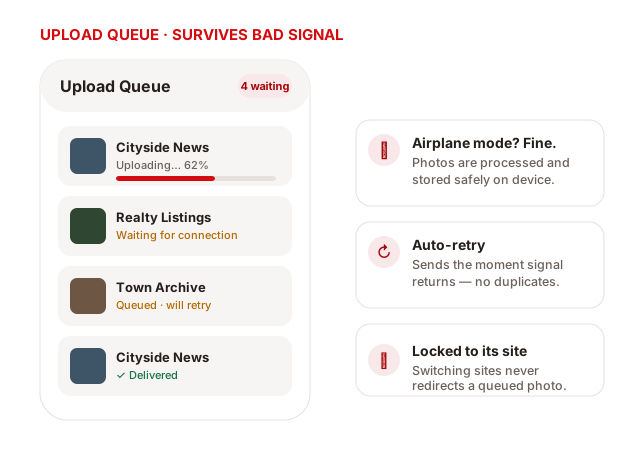
  • Automatic retry. Uploads resume the moment connectivity returns.
  • No duplicates. A server-side uniqueness constraint means an ambiguous retry returns the original attachment.
  • Locked to its destination. Queued photos stay tied to the site they were shot for, even if you switch sites.
Illustration of the upload queue showing photos uploading, waiting for connection, and delivered
Who it's for

Anyone whose work ends up on a WordPress site.

CaptureRelay is a general-purpose image pipeline — not a social app. It's for professionals who need clean, correctly sized photos published quickly and reliably.

NEWSLocal news placeholder image

Local news & field reporting

Photographers build a searchable community photo archive to draw on the moment a story breaks.

REALTYReal estate placeholder image

Real estate

Agents push consistent, listing-ready photos to their site straight from a walkthrough.

TRADESLandscaping and trades placeholder image

Landscaping & trades

Crews capture before-and-after project photos and post them to a portfolio on the spot.

EVENTSEvents and community placeholder image

Events & community

Organizations keep their calendars and galleries fresh with photos from the field.

Security & privacy by design

Serious protection for serious content.

Knowing a site's URL never authorizes an upload. Every device is explicitly approved, every request is signed, and every image is scrubbed. Security wasn't bolted on — it's the foundation.

Approved devices only

A site administrator approves each phone before it can upload. Devices can be rejected, revoked, or permanently blocked at any time — independently per site.

Unique, revocable credentials

Approval issues a random per-device credential stored in the iOS Keychain or Android Keystore. No shared passwords, no API keys typed into the app.

Signed, replay-proof uploads

Every request is HMAC-signed and bound to a timestamp, nonce, and body hash. Clock drift, reused nonces, and tampered payloads are rejected.

Encrypted at rest

Server-side credentials are protected with AES-256-GCM keyed from WordPress salts. Secrets, auth headers, and signatures are never written to logs.

No tracking, no location

CaptureRelay doesn't request location, use advertising identifiers, track across apps, or scan your library. It only receives the photos you pick.

Abuse-resistant

Atomic per-site, per-IP, and per-device rate limits, duplicate coalescing, strict image validation, and idempotent uploads keep your endpoint safe.

Full details are in our Privacy Policy and Terms of Use.

The other half

A free, focused WordPress plugin.

CaptureRelay is two purpose-built parts working together: the app on your phone and a lightweight plugin on your site. The plugin creates Media Library attachments only — it never creates or publishes posts.

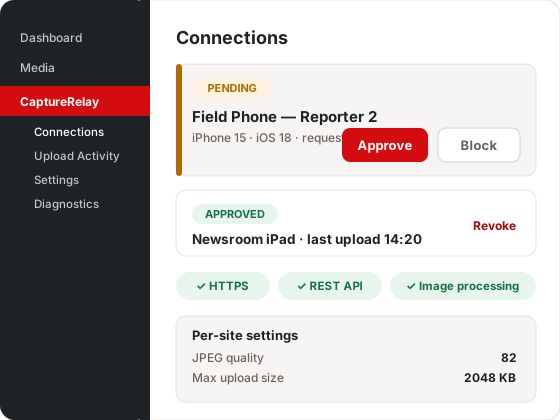
CaptureRelay WordPress admin screen showing device approval, diagnostics, and per-site settings
The app requests accessYou enter your site URL and name your phone.
An admin approves the deviceOne click in CaptureRelay › Connections. Revoke anytime.
Signed images arrive in the Media LibraryCorrectly sized, metadata stripped, with optional email alerts.

WordPress 6.6+ · PHP 8.1+ · GD or Imagick

Get CaptureRelay

One honest price. No subscriptions.

Buy the app once and keep it. The WordPress plugin is, and stays, free.

MOBILE APP

CaptureRelay for iOS & Android

$4.99one-time

A single purchase. No subscription, no per-upload fees, no ads.

  • Pro camera capture & library import
  • Multi-site delivery with per-site sizing
  • Offline upload queue with auto-retry
  • Titles, photo credit & light/dark mode
  • Secure device pairing & metadata stripping
  • Free updates for life
Download on theApp Store Coming soon (in review)

CaptureRelay for WordPress

Freeforever

The companion plugin — a free, direct download.

  • One-click device approval & revocation
  • Per-site JPEG quality & max size
  • Optional upload email notifications
  • Built-in diagnostics & activity log
  • Media Library attachments only — never posts

Prices in USD. App availability is subject to Apple App Store and Google Play review.

Answers

Frequently asked questions

Everything you need to know before you connect your first site.

How do I upload photos to WordPress from my phone?
Install the free CaptureRelay plugin on your WordPress site and the CaptureRelay app on your phone. Add your site's URL in the app and request access; an administrator approves your device once. From then on, take or pick a photo, choose your destination sites, and tap send — CaptureRelay delivers a correctly sized, compressed copy straight to your Media Library.
Does CaptureRelay need my WordPress username and password?
No. You never enter a WordPress username, password, API key, or destination folder in the app. Each phone is approved by a site administrator and receives its own unique, revocable credential stored in secure device storage. Every upload is cryptographically signed, and an administrator can revoke a device instantly from the dashboard.
Do I need approval before I can use the app?
You can install and explore CaptureRelay right away — add a site, name your device, and use the camera and framing guide. Uploading to a website is the one step that requires that website's administrator to approve your device first. This keeps every destination secure: knowing a site's URL never authorizes an upload.
Can I send one photo to several WordPress sites at once?
Yes. Select multiple approved sites before sending and CaptureRelay generates a separate copy for each, using that site's own width, height, and JPEG quality. The lead site controls the framing guide so you always know exactly what will publish.
What happens if I lose signal while uploading?
Your photos are processed and saved to a secure on-device upload queue. CaptureRelay retries automatically when the connection returns, and a server-side uniqueness constraint prevents duplicate attachments. Queued photos stay locked to the site they were captured for, so switching sites never redirects them.
Which platforms and WordPress versions are supported?
The app runs on modern iOS and Android devices. The plugin requires WordPress 6.6 or newer, PHP 8.1 or newer, HTTPS, and either the GD or Imagick image library. No wp-config.php changes are needed — activating the plugin enables connections.
How much does CaptureRelay cost?
The mobile app is a one-time $4.99 purchase on the Apple App Store and Google Play. The companion WordPress plugin is a free download. There's no subscription and no per-upload fee.
Where do my photos and information go — does CaptureRelay see them?
Your photos go only where you send them. CaptureRelay performs a user-directed transfer: when you upload, the app sends your image — along with a per-site device identifier, your device name and platform, any optional title and photo credit, and basic upload records — directly to the WordPress site you choose. CaptureRelay's publisher runs no central relay, cloud, or account service and never receives, stores, or sees your images or identifiers. Each destination site is operated independently and controls what it receives. Details are in our Privacy Policy.
Is my content and location data private?
Yes. CaptureRelay strips EXIF, GPS, XMP, and IPTC metadata from every image before delivery. It doesn't request device location, use advertising identifiers, track you across apps, sell personal information, or scan your photo library — it only receives the specific photos you select, and sends them only to the site you choose. See our Privacy Policy for the full data inventory.
Get in touch

Questions before you dive in?

Whether you're evaluating CaptureRelay for a newsroom, a brokerage, or a crew of one, we're happy to help. Send us a note and we'll get back to you personally.

  • Direct to a humanYour message reaches us straight away — no ticket queue, no bots.
  • Spam-hardenedProtected by multiple silent checks so real messages get through and bots don't.
  • Support & privacy requestsAsk about setup, licensing, or data deletion — all in one place.

Protected against spam. We never share your details.